








How Client-Side Rendering Affects Link Equity
For Technical SEOs, SaaS Founders, and Marketing Leaders
Executive Summary
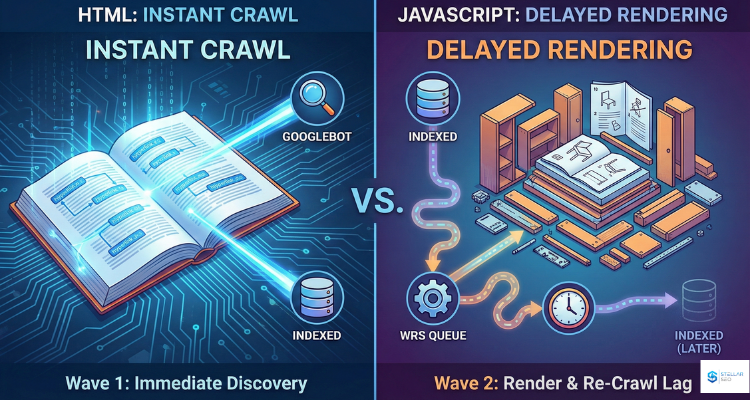
There is a long-standing belief that Google cannot understand JavaScript. That belief is outdated. Google can process JavaScript, but it does so through a separate rendering pipeline that introduces delay and uncertainty. When a backlink is built with standard HTML, Google discovers it immediately and can assign authority without additional processing. When the link is created via JavaScript, Google must render the page, execute the script, rebuild the DOM, and then re-crawl the resulting page. This creates a discovery lag that affects how quickly the link passes value.
There is also a structural issue. Links built as buttons, onClick handlers, router components, or other UI elements do not pass authority. Only properly formed anchor tags inside the rendered DOM count. The conclusion is simple. HTML links are instant and reliable. JavaScript-driven links can work, but they depend on correct implementation, Google’s rendering schedule, and your site’s crawl budget.
The Physics of the Crawl: HTML vs The DOM
Every modern website has two versions of itself. View Source shows the raw HTML that the server sends directly to Googlebot. Inspect Element shows the DOM after the browser or bot finishes executing JavaScript.
This difference is the reason JavaScript links behave unpredictably. HTML links exist in the raw source code. Googlebot sees them on the first request and can assign authority immediately. JavaScript links do not exist in the source. They are created only after the script runs, which means Google must render the page before discovering them.
A helpful comparison: HTML is a printed book that Google reads the moment it arrives. JavaScript is an IKEA manual where the furniture has to be assembled before it can be used. The more your website relies on JavaScript to build navigation or in-content links, the more you move from instant discovery to conditional discovery.
Google’s Two-Wave Indexing Process
This is the part most SEOs misunderstand. Google uses a two-stage system for processing JavaScript.
Wave 1: Instant HTML Crawl
Googlebot crawls the raw HTML. Only what exists at this stage is discovered immediately. If your link is not in the HTML, it is invisible during this wave.
The Queue: Web Rendering Service
Pages that require JavaScript are added to a rendering queue. Google must allocate CPU and memory to execute the script. This introduces a delay, and that delay varies by site.
Wave 2: Rendered DOM Crawl
The Web Rendering Service executes JavaScript, updates the DOM, and instructs Googlebot to re-crawl the rendered output. Your link has finally been discovered here. Assuming the script executed correctly, the link was built as a valid anchor, and Google allocated enough resources to render your page soon.
Why It Matters
HTML links are discovered instantly. JavaScript links are discovered only after rendering, and that process can take hours or weeks, depending on your site’s crawl budget and perceived importance. For SaaS and product-led growth companies that rely on fast acquisition, this delay becomes a real disadvantage.
The Button Trap: When a Link Is Not a Link
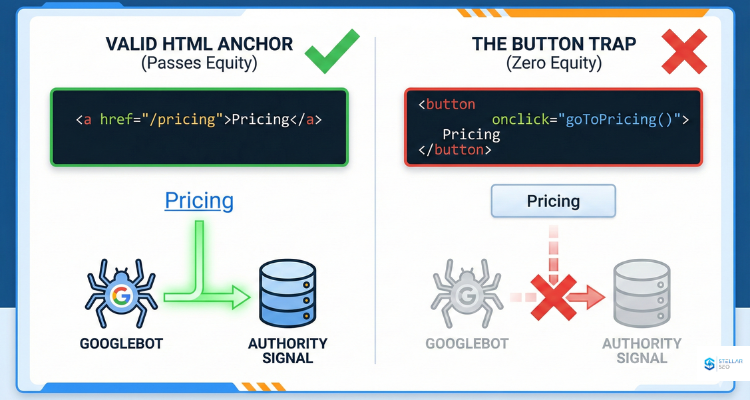
Modern SaaS teams often build UI-driven navigation that looks like links to users but is not a link to search engines. Google assigns authority only to anchor tags that contain an HREF attribute.
Working link:
<a href=”/pricing”>Pricing</a>
Non-working UI element:
<button onclick=”goToPricing()”>Pricing</button>
Looks like a link. Functions like a link. Passes zero SEO value.
Common traps include span tags with click handlers, divs styled as links, custom router components without real anchors, and hash links. A simple test exposes the issue. If you cannot right-click it and open it in a new tab, Google cannot treat it as a backlink.
Equity Decay and Time-to-Value
Even when JavaScript links work correctly, they introduce another issue: delayed authority. This matters for two reasons.
1. Time-to-Value
In HTML, a backlink can be discovered within minutes. In JavaScript, the link may not be recognized until Google renders the page. For a site with limited crawl budget or low authority, that delay can stretch into weeks. During competitive pushes or seasonal campaigns, that delay becomes a measurable disadvantage.
2. Crawl Budget Efficiency
JavaScript-heavy pages consume more of Google’s crawl resources. Any link that depends on this rendering cycle has a lower chance of being recrawled often enough for Google to consistently count it.
The Solution: Render Before Google Does
Server-Side Rendering and Static Site Generation solve this problem by sending Google a version of the page with fully resolved HTML links. Frameworks like Next.js and Nuxt make this possible. When you pre-render the content, you eliminate the rendering queue and the discovery lag.
How to Audit Your Backlinks for JavaScript Issues
Step 1: The View Source Test
- Visit the page linking to you.
- Right-click and select View Page Source.
- Search for your URL.
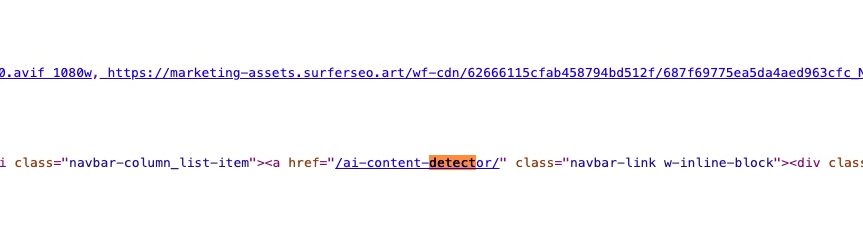
If your link appears in the source, it is an HTML link and passes authority. If it does not appear, it may have been injected via JavaScript and requires further verification.
Step 2: Rendered HTML Verification
Use Google’s URL Inspection tool or Mobile-Friendly Test to check the rendered DOM. If your link appears in the rendered version, it can pass a value as long as it uses a proper anchor tag. If it appears in neither location, it is not passing equity.
When It Makes Sense to Accept JavaScript Links
Not all JavaScript-driven backlinks are worthless. Context matters.
- Preferred: Static HTML links from clean, authoritative sites.
- Acceptable: JavaScript-generated links from high-authority publishers that Google renders frequently.
- Avoid: Links from low-authority JavaScript-heavy blogs, widgets, infinite scroll archives, or sites with poor indexing. Google may never render them, which means your backlink may never exist in the algorithm’s eyes.
Strategic EDLS Alignment
Backlinks are authority signals. The format of the signal affects its strength, timing, and classification. A JavaScript-heavy implementation can slow discovery, weaken context, and reduce the value of otherwise strong links.
- Deep Dive: For insight into how Google evaluates link context, see Backlinks as Authority Signals.
- SaaS Specifics: Review our SaaS Link Building guidance to see how EDLS reinforces topical identity even when architecture creates rendering challenges.
- Fixing It: Teams dealing with indexing delays can refer to Google’s Technical SEO resources to resolve JavaScript-specific issues.
If your goal is to improve link impact, resolve rendering inefficiencies, and build an authority profile that scales across future algorithm changes, our EDLS framework provides the structure to support that growth. Our team can help you combine technical accuracy with signal engineering so your brand earns the trust modern search systems require.